
pcd BUILDS | HIGH END BUILD | WHITE ROG TITAN 4090
White ROG Titan 4090 is a high-end gaming and creator build made for users who want serious 4K performance, premium cooling, strong visual identity, and enough power headroom for a top-tier RTX system. The build is centered around the ASUS ROG Strix GeForce RTX 4090 White OC 24GB and the ASUS ROG Strix 1000W Platinum power supply, so the whole setup naturally leans into a clean white ROG theme. This is not a budget-friendly configuration and it is not meant to be subtle. It is a flagship-style PC for heavy gaming, ray tracing, high-refresh 4K, streaming, editing, and long-term enthusiast use.

GRAPHICS CARD | ASUS Rog Strix RTX4090-O24G-White
The GPU is the heart of this build, and the ASUS ROG Strix GeForce RTX 4090 White OC 24GB gives it a proper flagship foundation. ASUS lists this card with 24GB of GDDR6X memory, 16,384 CUDA cores, a 384-bit memory interface, and boost clocks up to 2640 MHz in OC mode, which puts it firmly in the ultra-high-end class for gaming and creator workloads. In real use, this is the type of card made for 4K gaming, heavy ray tracing, DLSS 3, high-resolution texture packs, AI-assisted workloads, video editing, and anything where GPU power actually matters. The white Strix design also makes it a natural visual centerpiece for this build, especially inside a white case with clean lighting. It is large, expensive, and power-hungry, but that is expected here. This build is being designed around it, not trying to squeeze it into a compromise system.
PROCESSOR | AMD Ryzen 7 9800X3D
For the CPU, I would use the AMD Ryzen 7 9800X3D. It fits this build better than a standard productivity-heavy chip because this system is gaming-first, and the 3D V-Cache design is exactly what you want for high-end gaming performance. AMD lists the 9800X3D as an AM5 processor with DDR5 support, PCIe 5.0 support, and a 95°C maximum operating temperature, while the platform gives enough modern connectivity for a premium system. It is also easier to cool and manage than some hotter high-core-count CPUs, which matters when you want a powerful but stable daily machine. With an RTX 4090, the CPU should not hold the card back in modern games, especially at 1440p high refresh and 4K. For streaming, multitasking, and normal creator work, it is still strong enough, but its main reason for being here is simple: it is one of the best gaming CPUs to pair with a monster GPU.
MAINBOARD | ASUS ROG Crosshair X870E Hero
For the motherboard, the ASUS ROG Crosshair X870E Hero is the right class of board for this build. It keeps the system inside the ROG ecosystem, supports modern AM5 Ryzen processors, and gives the build the kind of premium platform features that make sense with this hardware level. ASUS lists support for DDR5 memory, high memory speeds with Ryzen 9000 processors, PCIe 5.0 connectivity, multiple M.2 options, WiFi 7, USB4, and a strong power delivery setup. That matters because a build like this should not feel like a powerful GPU sitting on a cheaper board. The Crosshair X870E Hero gives enough expansion and storage flexibility for a serious PC that might grow over time. It is more expensive than necessary for normal gaming, but for this white ROG Titan concept, the board fits the tone: premium, clean, stable, and ready for high-end hardware.
POWER SUPPLY | ASUS ROG Strix 1000W Platinum
The ASUS ROG Strix 1000W Platinum is a strong match for this build because the RTX 4090 deserves clean, stable power and enough headroom. ASUS lists this PSU as ATX 3.1, 80 Plus Platinum, with a 1000W capacity, active PFC, and protection features including OPP, OVP, UVP, SCP, OCP, and OTP. That is exactly the type of unit I would want behind a premium GPU and modern AM5 platform. A cheaper PSU would technically work if it had enough wattage and quality, but it would not fit the build philosophy. This system is about stability, low noise, and not cutting corners on the parts that keep the machine safe. The ROG Strix 1000W Platinum also keeps the ASUS theme consistent, which matters visually if this is going into a showcase-style case. For a high-end white ROG build, this PSU is not just enough; it feels appropriate.
RAM MEMORY | 64GB DDR5 6000 CL30 White RGB
For RAM, I would go with 64GB DDR5 6000 CL30, ideally in a white RGB kit such as G.Skill Trident Z5 Neo RGB White 2x32GB or a similar EXPO-ready kit. For AM5 gaming builds, DDR5 6000 is still a very sensible sweet spot because it balances speed, stability, and real-world performance without forcing unnecessary memory tuning problems. The 64GB capacity also gives this build a more premium and long-term feel. For pure gaming, 32GB is still enough in most cases, but a machine with an RTX 4090 should not feel tight when running heavy browsers, launchers, Discord, recording software, mods, editing apps, or creative tools in the background. The white heatspreaders and RGB lighting also help the visual direction of the build. This is not the place to save a little money by going with plain 32GB memory. The rest of the system is too high-end for that.
STORAGE | 2TB PCIe 5.0 NVMe + 4TB PCIe 4.0 NVMe
For storage, I would use a two-drive setup: one 2TB PCIe 5.0 NVMe SSD for Windows, main apps, and the most demanding games, plus one 4TB PCIe 4.0 NVMe SSD for the larger game library, captures, downloads, and project files. A build like this should not feel cramped after installing a few modern games. The 2TB Gen5 drive gives the system a premium boot and main-drive setup, while the 4TB Gen4 drive is the practical storage workhorse. This is better than putting everything on one huge drive because it keeps the system cleaner and easier to manage. For example, the main drive can stay focused on OS and active titles, while the second drive handles bulk storage. With the Crosshair X870E Hero offering multiple M.2 options, this kind of storage layout makes sense. It is fast, clean, and much better suited to a serious high-end build than a single 1TB SSD.
CASE | Lian Li O11 Dynamic EVO RGB White
For the case, I would use the Lian Li O11 Dynamic EVO RGB White or another large white showcase case with strong radiator and fan support. The RTX 4090 Strix is a huge card, so this build needs space, not a cramped mid-tower where airflow and cable management become annoying. The O11-style layout works well for premium builds because it gives the GPU room to breathe, shows off the motherboard and cooling, and allows a clean white/RGB presentation without looking messy. It also gives enough flexibility for side, bottom, and top airflow, which matters with a card this powerful. This case choice is partly practical and partly visual. A high-end white ROG build should look intentional, not like random premium parts thrown into any box. With the right fans and cable routing, this case can make the system look like a finished showcase PC rather than just a powerful desktop.
CPU COOLER | ASUS ROG Ryuo III 360 ARGB White
For cooling, I would choose the ASUS ROG Ryuo III 360 ARGB White or a similar high-end 360mm AIO cooler. The Ryzen 7 9800X3D does not need the most extreme cooling setup on earth, but this build is not just about “enough.” A 360mm AIO gives thermal headroom, lower noise potential, and a cleaner visual match with the ROG/white theme. It also helps keep the top of the build visually balanced, especially inside a showcase case. Since the RTX 4090 will be the biggest heat source in the system, keeping CPU cooling efficient and quiet is important for the overall feel. A good AIO also avoids the visual bulk of a large air cooler, which matters if the goal is a clean build with visible RGB memory, motherboard design, and cable work. This cooler choice fits the theme and keeps performance stable without making the system look overcrowded.


Additional Peripherals
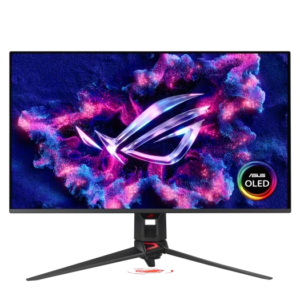
MONITOR | ASUS ROG Swift OLED PG32UCDM 32″ 4K 240Hz
For the monitor, this build deserves a 32-inch 4K OLED high-refresh display, and the ASUS ROG Swift OLED PG32UCDM is the type of screen that makes sense here. An RTX 4090 is wasted on a basic 1080p monitor. This GPU is made for 4K, high refresh, ray tracing, HDR, and visually heavy games where image quality actually matters. A 4K 240Hz OLED gives the build a display target that matches its performance level. It is useful for competitive titles because of the refresh rate and response, but it also makes single-player games look far better than a normal IPS or VA panel. The only real downside is price, and OLED care is still something users should take seriously. But for this kind of system, the monitor should be premium. A build called White ROG Titan 4090 should not be paired with an average display.
KEYBOARD | ASUS ROG Azoth Extreme / ROG Azoth White
For the keyboard, I would choose the ASUS ROG Azoth line, preferably a white or premium version if available. This keeps the ROG theme alive without forcing a full-size keyboard onto a desk that may already have a large monitor and gaming mousepad. The Azoth style works well because it feels enthusiast-grade: compact, premium, mechanical, and better suited to a high-end setup than a basic gaming keyboard with loud branding. A smaller layout also leaves more mouse room, which is useful even if this build is more of a 4K powerhouse than a pure esports machine. The keyboard does not need to be the most expensive part of the setup, but it should match the quality of the rest of the PC. A weak keyboard next to this kind of tower would feel out of place. The Azoth fits the build’s premium desktop identity.
MOUSE | Logitech G502 X Plus White
For the mouse, I would use the Logitech G502 X Plus White. It gives the setup a strong all-around mouse without going too extreme into ultralight esports territory. The shape is comfortable, the extra buttons are useful for RPGs, MMOs, productivity shortcuts, and general desktop control, and the white version visually matches the build. This is a PC that will probably be used for many types of games, not only competitive shooters, so a flexible mouse makes more sense than a very specialized one. The G502 X Plus also looks right next to a white ROG build, especially if the desk setup is being built around a black/white/orange pcdoorz-style look. Some players may prefer a lighter mouse, but for a high-end all-around gaming station, the G502 X Plus is a safe and polished choice.
EXTRA FANS | Lian Li UNI FAN SL-INF 120 White / ASUS ROG White Fans
For extra fans, I would use a full set of Lian Li UNI FAN SL-INF 120 White fans or matching ASUS ROG white ARGB fans, depending on the final case layout. With an RTX 4090, airflow is not decoration. It is part of the build’s stability. A strong fan setup should bring fresh air from the bottom and side, then exhaust through the top and rear, depending on the case configuration. The Lian Li UNI FAN system is especially nice because it reduces cable clutter and gives the build a clean, synchronized look. That matters a lot in a showcase-style white PC. The goal is not to cover the system in random RGB, but to make the airflow and lighting look controlled. Good fans also help the GPU and motherboard area stay cooler, which can reduce noise because the system does not need to ramp everything aggressively.
| – COMPONENT – | – SELECTED PART – | – PURPOSE / WHY IT FITS – | – UPGRADE NOTE – |
| PROCESSOR | AMD RYZEN 7 9800X3D | elite gaming cpu foundation | easy AM5 upgrade path later |
| GRAPHICS CARD | ASUS ROG STRIX RTX4090 24GB WHITE | flagship 4k gaming and creator power | upgrade only if chasing extremes |
| MAINBOARD | ASUS ROG CROSSHAIR X870E HERO | premium mainboard for flagship builds | ready for future AM5 upgrades |
| POWER SUPPLY | ASUS ROG STRIX 1000W PLATINUM | clean power for premium hardware | enough headroom for future hardware |
| RAM MEMORY | 64GB DDR5 6000 CL30 WHITE RGB | fast memory for smooth multitasking | already strong for long-term use |
| STORAGE | 2TB PCIe 5.0 NVMe+4TB PCIe 4.0 NVMe | fast storage for massive libraries | easy to expand storage later |
| PC CASE | LIAN LI O11 DYNAMIC EVO RGB WHITE | showcase case for clean airflow | supports future hardware upgrades |
| CPU COOLER | ASUS ROG RYUHO III 360 ARGB WHITE | quiet premium cooling | cooling headroom stays upgrade-friendly |
| MONITOR | ASUS ROG SWIFT OLED PG32UCDM 4K | 4k oled for flagship gaming | upgrade not required |
| KEYBOARD | ASUS ROG AZOTH EXTREME / WHITE | premium keyboard for clean control | upgrade not required |
| MOUSE | LOGITECH G502 X PLUS WHITE | versatile mouse for precise control | upgrade not required |
| EXTRA FANS | LIANLI UNISLINF120 WHITE / ASUS WHITE | clean airflow for white builds | upgrade not required |
The only reason it does not get 100 is price. Performance, design, platform strength, cooling potential, and upgrade headroom are all excellent, but the cost is very high and some users could get strong gaming performance for much less. Still, for a premium white RTX 4090 build, this is exactly the kind of configuration that feels complete.