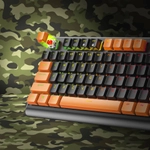
REVIEW | YENKEE YKB-WT300US DESTROYER | BUDGET WARRIOR WORTH CONSIDERING
When you’re building or upgrading a gaming setup on a budget, keyboards are one of the components where compromises often happen. But the Yenkee YKB-WT300US Destroyer is a rare find in this range a mechanical gaming keyboard that doesn’t feel “cheap-cheap,” yet avoids the premium markup of enthusiast-grade boards. Based on available specs and real-world impressions, here’s a breakdown of how the Destroyer fares where it shines, where it stumbles, and for whom it’s a smart pick.
Spec Overview and Build Quality
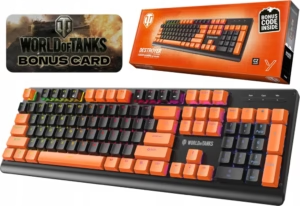
Let’s start with the facts, drawn from the official Yenkee site. The Destroyer features Outemu Red linear switches, rated for 50 million keystrokes. It has a full 104-key layout, N-Key Rollover (anti-ghosting), and adjustable RGB lighting. Its frame is built from a metal alloy, while the keycaps are ABS plastic. The keyboard weighs in at 805 grams, and its dimensions are 444 × 145 × 40 mm, with a 1.8 m braided USB cable. Its system compatibility is quite broad: it supports Windows 7/8/10/11 and connects via a simple plug-and-play USB interface. From a design standpoint, the Destroyer leans into rugged simplicity: the metal-alloy top plate feels solid and gives a premium heft, but the overall aesthetic doesn’t try to compete with ultra-high-end boards. It’s clearly built for reliability rather than flash. According to Yenkee, the keyboard also has adjustable feet at two angles, which helps for long gaming or typing sessions.
Typing & Gaming Performance
The Outemu Red switches are linear, meaning there’s no tactile “bump” or click the keystroke is smooth and fast. This is a very deliberate choice: linear switches are often preferred in competitive gaming, where rapid keypresses matter more than a tactile “feel.” For FPS or action games, these switches provide a fluid, low-effort experience. In real-world usage, these switches are light but consistent: they don’t wobble or feel too loose. For typing, they may not have the feedback of tactile or clicky switches, but they still feel reliable. Many users report that they comfortably use the Destroyer for both work and gaming, especially when they don’t need macro-heavy or ultra-custom layouts.
Anti-Ghosting & Rollover
Thanks to N-Key Rollover, the Destroyer can register multiple simultaneous key presses reliably. That’s a big plus in gaming particularly in competitive or combo-heavy games where you might be holding several keys at once. Input lag or missed presses are less likely, which makes this keyboard more responsive than typical membrane or cheaper non-mechanical alternatives.
RGB Lighting
The RGB lighting is fully adjustable via onboard shortcuts. You don’t need any software a big win if you dislike installing proprietary apps or keeping background processes just for keyboard lighting. Multiple modes and effects are available, giving you enough flexibility to match the rest of your rig. One quirk the keyboard’s color tones are not perfect for every taste. Some users have noted that if you’re trying to match a very specific color (for example, orange keycap accents), the closest shade through the RGB isn’t true orange it can lean more toward yellow. It’s not a dealbreaker, but it’s something to keep in mind for aesthetics-conscious builders.
Build & Durability
The metal-alloy frame is one of the Destroyer’s strongest points. At 805 g, it’s heavy enough that the keyboard doesn’t shift around during intense sessions. The frame feels very rigid, and there’s no creaking or wobble even under pressure (which you might expect for a budget-friendly mechanical keyboard). The adjustable feet let you tilt the keyboard, which is helpful for ergonomics especially if you game or type for hours. It’s not a full ergonomic keyboard, but having two height options is better than many entry-level models. One trade-off: ABS keycaps. While ABS is standard and perfectly serviceable, it’s not as premium or durable as PBT. Over time, these keycaps might show more shine, especially on often-used keys. But for its price tier, this configuration is solid.
Noise & Comfort
Linear switches like the Outemu Reds are inherently quieter than clicky ones, but that doesn’t mean the keyboard is silent. Keypresses still generate a soft “thock,” and when you bottom out, you can hear the sound of the key hitting the metal frame. It’s not overly loud, but it’s there loud enough to be noticed in very quiet environments, especially if you’re a heavy typer or gamer. On the flip side, the keyboard is very comfortable for extended sessions. The lack of aggressive tactile feedback reduces finger fatigue, and the stable build means your wrists aren’t fighting with flexing plastic. The adjustable feet help find a comfortable angle, reducing strain on the wrists.
Compatibility & Software
One of the most appealing things about the Destroyer is how little fuss there is to set it up. It’s plug-and-play: just plug the USB cable into your PC and you’re ready. No installing software, no driver downloads, no app-based macro setup. That simplicity is a double-edged sword you don’t get macro customization, per-key RGB control, or profile saving. For gamers who want deep customization especially in MMO or productivity builds this might feel limiting. But if you want a reliable keyboard that works out of the box, the trade-off is very reasonable. Interestingly, I found little to no mention of third-party firmware or driver support for customizing lighting or macros. Some Reddit users speculate that the keyboard doesn’t support advanced firmware tweaks, and that customizing layers beyond what the default RGB modes allow may not be possible.
Real-World Use | Gaming, Work & Mixed
In gaming, the Destroyer is a very strong performer. Its linear switches feel fast and precise, and the N-Key Rollover ensures you’re not dropping keystrokes in hectic situations. On PUBG, CS:GO, or other fast-paced games, the keyboard responds well, and you feel confident pressing multiple keys while moving or crouching. For key spamming in MOBA or action games, the lack of tactile resistance actually works in your favor. For typing and productivity work it’s not the most premium typing experience, but it’s surprisingly decent. The linear travel makes it smooth, and long typing sessions don’t feel too fatiguing. The metal frame adds a little heft, which helps keep the keyboard stable even if you’re typing hard. If you’re doing a lot of writing or programming, the Destroyer will serve you reliably though it won’t have the refined feedback of a high-end, tactile mechanical keyboard. If your usage is mixed gaming and work, this keyboard hits a very sweet spot: mechanical feel, good build, good stability, and no need for complicated software.
Pricing & Value
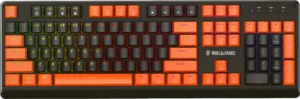
According to Yenkee and a few European retailers, the Destroyer is very competitively priced for what it offers. The metal construction, Outemu switches, RGB lighting, and full 104-key layout are rare features to find at such a budget-friendly price point. For gamers or users on a tighter budget, this is a great value. You’re not paying for brand premium, but you’re still getting a mechanical experience that feels robust and capable. In comparison to more basic gaming keyboards (membrane or hybrid), the Destroyer punches well above its weight.
Weaknesses & Where It Could Be Better
Even a decent budget keyboard has its compromises. Here’s what to watch out for: Lack of advanced software No macro editor, no memory profiles, no per-key RGB customization. For many users that’s fine; for others, a real limitation. RGB limitations The default lighting modes are decent, but the color fidelity might not match premium boards especially if you’re chasing very specific color tones (like “true orange”). ABS keycaps These are standard but prone to shine over time; they’re not PBT. Weight and size At 805 g and a full-size layout, it’s not a compact keyboard. If you run a small desk, this could be a downside. No media keys or wrist rest If you’re used to a keyboard with dedicated media controls or a padded wrist rest, you might miss that. Potential firmware limitations Based on lack of third-party support and user reports, you likely can’t flash advanced firmware or remap keys deeply.
Who Is This Keyboard For And Who Might Skip It
Ideal users Budget-conscious gamers You want mechanical switches and N-Key rollover, but don’t need premium software or fancy macro support. Casual competitive players FPS, MOBA, or other games where fast, linear key presses matter more than clicky feedback. Work + gaming hybrid You’re okay with a mechanical keyboard that does both jobs decently without spending too much. Plug-and-play builders You don’t want to tinker with drivers, profiles, or software you just want it to work when you plug it in. Less ideal for Power users/macro lovers If you need powerful macro customization, per-key RGB, or profiles, this keyboard will feel limiting. Keyboard enthusiasts If you care deeply about switch feel, lube, keycap premium quality, or swapping switches this is not your hobby board. Compact setup owners Small desks or portable setups might struggle with its size and weight. Users needing media controls No dedicated media or volume keys.
Conclusion
The Yenkee YKB-WT300US Destroyer is not breaking any ground in high-end mechanical keyboards but it doesn’t need to. What it delivers is very solid performance, dependable mechanical feel, and surprising build quality for a price that doesn’t punish budget builders. It’s not for everyone, but for someone who values functionality, reliability, and simplicity over flashy extras, it’s a compelling choice. Putting it all together: if you’re watching your wallet but still want a durable mechanical keyboard with responsive switches, solid build, and RGB flair the Destroyer is absolutely worth considering. It may not match premium brands in polish or features, but for its class, it’s one of the most practical and well-rounded options out there.
Advantages
Smooth, fast Outemu Red linear switches
N-Key Rollover ensures no input conflicts
Durable metal-alloy frame
Customizable RGB without needing software
Excellent value for a mechanical keyboard
Distadvantages
No dedicated software, macro, or profile support
RGB color range may lack nuance (e.g. “true orange”)
ABS keycaps may develop shine over time
Large, heavy design less suited for compact desks
No media keys or wrist rest