REVIEW | ASUS TUF K1 RGB KEYBOARD | QUIET CONFIDENCE IN AN AFFORDABLE GAMING KEYBOARD
Recently I decided to pick up the ASUS TUF Gaming K1. Not as part of some planned upgrade, not because I desperately needed a new keyboard, but simply out of curiosity. A new peripheral always sparks a certain interest, and sometimes the best reviews come from those spontaneous purchases that were never meant to become reviews in the first place. Hardware often reveals its true character only after a few days of real use, far away from marketing promises and polished product photos. After spending some time with the keyboard, one thought kept returning: how could I not write about it for you?
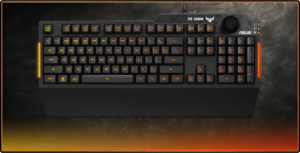
The first impression was honestly fantastic. Budget gaming keyboards often promise a lot but feel underwhelming once they land on your desk. Plastic frames, hollow typing sounds, overly aggressive RGB lighting, and questionable build quality are common traits in the lower price range. The K1 immediately felt different. The moment it comes out of the box, the keyboard gives the impression of something far more refined than its roughly forty-five euro price tag would suggest. The chassis feels sturdy and surprisingly dense. Instead of the hollow feeling common among budget boards, the K1 sits firmly on the desk with reassuring stability. Nothing creaks when pressure is applied, and the frame does not flex during normal use. This solid construction creates a sense of durability that fits perfectly with ASUS’s TUF philosophy. The brand has always emphasized reliability and toughness in the TUF lineup, and the keyboard clearly follows that design approach. What stands out most in those first moments is the sense that the keyboard simply feels “right.” The layout is conventional, the proportions are balanced, and nothing about the design feels forced or gimmicky. Many gaming keyboards attempt to impress with aggressive shapes or excessive lighting zones, but the K1 opts for a more restrained aesthetic that still looks distinctly gaming-oriented without crossing into visual chaos.
Build Quality – TUF Philosophy in Practice
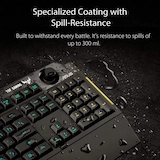
The TUF series exists to deliver durability and reliability without inflating the price unnecessarily, and the K1 reflects that idea well. The keyboard’s construction emphasizes structural integrity. Rubberized feet on the underside keep the board firmly planted on the desk, preventing unwanted movement during typing or gaming sessions. Even when pressing keys aggressively, the keyboard remains stable. A keyboard that shifts around during use quickly becomes frustrating, especially during gaming sessions that demand rapid input. Stability might sound like a minor detail, but it plays a significant role in long-term comfort. The K1 handles this aspect extremely well. Another practical feature worth mentioning is the keyboard’s IPX4 splash resistance. Accidental spills happen more often than most people would like to admit. Coffee, water, or energy drinks can easily find their way onto a keyboard during long sessions at the desk. ASUS designed the K1 to tolerate minor liquid exposure, providing an additional layer of reassurance for everyday use. It does not mean the keyboard should be treated carelessly, but it certainly reduces anxiety about the occasional mishap.
Typing Experience – Soft, Quiet, and Surprisingly Pleasant
Typing on the K1 quickly reveals its most charming quality. The keystrokes feel soft and fluid, almost “rubbery” in the best possible way. Membrane keyboards sometimes receive criticism for feeling vague or mushy, but the K1 manages to avoid those pitfalls. The key travel is smooth and predictable, and the return is consistent across the entire keyboard. The most noticeable characteristic is how quiet the typing experience is. Instead of producing sharp mechanical clicks or high-pitched plastic sounds, the keyboard emits a subdued, low tone. This subtle sound profile makes the K1 extremely comfortable during long writing sessions. Typing feels relaxed rather than distracting. For anyone who spends hours at the keyboard writing articles, coding, or gaming this quietness becomes a real advantage. High-pitched keyboard sounds can quickly become irritating over time, especially in shared spaces or during late-night sessions. The K1’s softer acoustic character creates a far more comfortable environment.

Indicator Lights – Simple but Useful Details
On the right side of the keyboard three small LEDs act as status indicators. These lights correspond to Caps Lock, Num Lock, and Scroll Lock. Their placement is subtle but effective, allowing users to quickly check the keyboard’s status without drawing unnecessary attention to themselves or disrupting the overall design of the keyboard. Caps Lock indicates whether uppercase typing is active, which is especially helpful when writing longer texts where accidental capitalization can quickly become frustrating. Num Lock controls the numeric keypad, an essential feature for anyone who regularly works with numbers, spreadsheets, or data entry. Scroll Lock remains largely unused in modern applications, yet it continues to exist as part of the traditional keyboard control set and can still appear in certain legacy software environments. What makes these indicator lights stand out slightly more than expected is their visual clarity. The illumination is sharp, clear, and very precise, making it immediately obvious when one of the functions is active. The LEDs produce a bright and vivid orange tone that fits perfectly with the keyboard’s overall RGB theme. Instead of appearing dim or washed out, the light is distinctly vibrant, almost a glowing amber that remains easy to notice even in well-lit environments. At the same time, the brightness is balanced enough that the lights never feel distracting during normal use. They are visible when needed, yet subtle enough to blend into the keyboard’s aesthetic when not actively being checked. These small details might seem trivial at first glance, yet they reflect a thoughtful approach to design. Clear indicator lights reduce confusion and improve usability during everyday tasks, and in the case of the K1 they also contribute to the keyboard’s overall visual identity with that sharp, unmistakably orange glow.
RGB Lighting – Customization Through ASUS Software
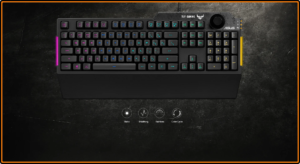
The keyboard includes full RGB illumination, controlled through ASUS Armoury Crate. Once installed, the software allows users to adjust lighting effects, colors, brightness levels, and synchronization with other ASUS devices. What impressed me personally was the default color choice. Out of the box, the keyboard glows with a vibrant orange tone that immediately caught my attention. That color happens to integrate perfectly with my existing RGB setup. My system already uses orange accents, so seeing the keyboard naturally match the rest of the lighting environment felt like a fortunate coincidence. The customization options within Armoury Crate are extensive. Static colors, breathing effects, color cycling, and other dynamic lighting patterns are available. For those who enjoy experimenting with RGB aesthetics, the software offers more than enough flexibility to create a personalized lighting profile. After some adjustments I managed to fine-tune the orange tone exactly the way I wanted it. Achieving that perfect color match between components might sound trivial, but when everything aligns visually, the entire setup suddenly feels more cohesive and intentional.
Wrist Rest – A Small Addition with Big Impact
One of the most appreciated features of the ASUS TUF Gaming K1 is the detachable wrist rest. ASUS included a comfortable support platform that attaches neatly to the keyboard’s front edge, creating a natural extension of the typing surface. At first glance the wrist rest might appear fairly simple in construction and, if one were being very critical, it can give off a slightly plastic impression when you first take the keyboard out of the box. That initial visual impression might suggest a basic accessory rather than something that will significantly influence the experience. However, that perception changes almost immediately once your hands rest on it and typing begins. The moment your wrists settle into position, the practical benefit becomes obvious. The support feels stable, the surface is comfortable, and the entire typing posture becomes noticeably more relaxed. What initially seemed like a minor accessory quickly reveals itself as an essential ergonomic component of the keyboard. Typing without proper wrist support often leads to tension or fatigue during long sessions, especially when working on extended articles, coding, or gaming late into the night. The wrist rest allows the hands to settle naturally into position, reducing strain and encouraging a more neutral wrist angle. The difference becomes noticeable after only a few minutes of use, and once you become accustomed to it, typing without that support begins to feel noticeably less comfortable. During longer sessions the benefit becomes even clearer. Hands feel supported rather than suspended above the desk, and the keyboard itself almost seems to invite a relaxed typing rhythm. For extended writing sessions or long gaming nights, the wrist rest proves to be a genuinely valuable addition. It elevates the comfort level of the entire setup and helps the K1 feel more refined than many keyboards within the same price category. In practice, what begins as a small accessory ends up playing a major role in the overall experience. The wrist rest might look modest at first glance, but once the typing begins, it quickly becomes one of the most appreciated features of the keyboard.
Multimedia Controls and Practical Features
Beyond basic typing functionality, the K1 includes several features designed for convenience. Dedicated multimedia controls allow users to pause music, skip tracks, or adjust system volume without leaving the current application. The keyboard also includes a volume wheel on the upper right side. This simple control proves surprisingly useful during everyday use. Adjusting sound levels becomes instantaneous, eliminating the need to search through software menus or keyboard shortcuts. Gaming performance also benefits from features like key rollover, ensuring that multiple simultaneous key presses are registered correctly. This reliability is essential in fast-paced games where precise input can make the difference between success and failure.
Minor Observations – Small Things That Could Improve
Despite the overwhelmingly positive impression, a couple of small observations deserve mention. The RGB lighting system offers several brightness levels, but one additional step between the existing levels might have provided finer control. This is a minor detail rather than a significant flaw, yet it would have been a welcome addition. Another observation concerns the keyboard’s height adjustment. The K1 provides a single adjustable angle through its rear feet. That angle works well and feels comfortable, but including an additional height level would have allowed users to experiment with different typing positions. Even so, the existing angle combined with the wrist rest creates a surprisingly comfortable typing posture. Hands feel relaxed, and the keyboard naturally encourages a neutral wrist position.
Long-Term Impressions – Reliability Over Time
Spending more time with the keyboard only reinforced the initial impression. The ASUS TUF Gaming K1 remains stable, responsive, and comfortable even after extended use. The keys maintain their consistent feel from the first press to the thousandth, and the soft membrane response continues to deliver the same quiet, fluid typing experience that stood out during the first days of testing. Nothing begins to feel loose or uneven over time, which is often the first sign of weakness in cheaper keyboards. Daily use also highlights how dependable the overall construction really is. The chassis remains firmly planted on the desk, the keycaps show no unwanted wobble, and the wrist rest continues to provide the same level of support that made long typing sessions comfortable from the beginning. The keyboard simply behaves predictably every time it is used, which might sound ordinary but is actually one of the most valuable traits a peripheral can have. The RGB lighting system also proves to be reliable in the long run. Controlled through ASUS Armoury Crate, the lighting effects remain stable and consistent, and color settings hold their calibration without unexpected changes. Once the desired color profile is set, the keyboard continues to display it exactly as configured, making it easy to maintain a cohesive look across the entire setup. Perhaps the most impressive aspect of the K1 becomes clearer with time: balance. The keyboard does not attempt to compete with premium mechanical boards costing several hundred euros, nor does it pretend to offer features that belong to an entirely different price category. Instead, it focuses on delivering strong fundamentals solid build quality, comfortable ergonomics, quiet typing, and practical functionality. For its price category, the keyboard performs remarkably well. Many competing models in this range compromise heavily in at least one key area. Some offer attractive RGB lighting but feel flimsy in construction, while others provide decent build quality but sacrifice ergonomic comfort or software customization. The K1 manages to avoid those pitfalls and instead delivers a convincing combination of durability, comfort, and visual appeal. Over time that balance becomes its defining strength. Rather than chasing exaggerated features or flashy marketing claims, the keyboard simply continues to perform its role reliably day after day. In practice, that quiet reliability often proves far more valuable than any headline-grabbing specification.
Price and Value – Hard to Beat in Its Category
Considering the price of roughly forty-five euros, the value proposition becomes extremely compelling. In the crowded world of gaming peripherals, this price range is usually filled with compromises. Many keyboards at this level look attractive in product photos but quickly reveal their limitations once placed on the desk. Lightweight frames, hollow typing acoustics, inconsistent key response, and RGB lighting that feels more like decoration than a functional feature are common realities in the budget category. That is precisely why the ASUS TUF Gaming K1 stands out so clearly once you spend some real time using it. The keyboard immediately gives the impression of a product that belongs to a higher price bracket. The chassis feels stable and durable, the typing experience is smooth and quiet, and the overall construction suggests longevity rather than disposable design. Nothing about the K1 feels rushed or cheaply assembled. Instead, it carries the same practical philosophy that defines many products within the ASUS TUF ecosystem: focus on durability, reliability, and everyday usability rather than superficial extravagance.Another aspect that strengthens the value proposition is the surprisingly well-integrated RGB ecosystem. Through ASUS Armoury Crate, users gain access to a wide range of lighting effects and customization options. Many keyboards in this price category offer RGB lighting, but the implementation often feels limited or gimmicky. The K1 benefits from ASUS’s mature software environment, allowing users to fine-tune colors, synchronize effects with other components, and create a lighting profile that actually complements the rest of a gaming setup. This level of control adds real value rather than acting as a simple marketing checkbox. The inclusion of the detachable wrist rest further reinforces the sense that the keyboard offers more than expected for the price. Ergonomic accessories are often omitted from budget keyboards, yet they can dramatically improve comfort during long typing or gaming sessions. Having that support included in the package makes the K1 feel like a complete solution rather than a stripped-down entry product. When all these elements come together solid construction, comfortable typing, customizable RGB lighting, and thoughtful ergonomic design the K1 begins to look less like a budget keyboard and more like an exceptionally well-priced one. Finding a competing keyboard that offers the same balance of durability, comfort, and features within the same price range would not be easy.That balance is ultimately what defines the strength of the K1. It does not attempt to imitate expensive mechanical keyboards, nor does it rely on exaggerated marketing claims. Instead, it delivers a reliable and satisfying experience where it matters most. For users who want a dependable gaming keyboard without stretching their budget, the ASUS TUF Gaming K1 strikes a rare and very welcome equilibrium between affordability and functionality.