
REVIEW | ASUS TUF GAMING GT301 | AIRFLOW, AESTHETICS & VALUE IN A COMPACT BUILD
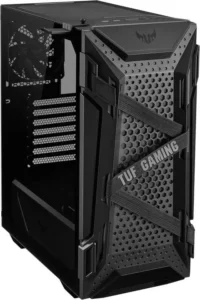
ASUS TUF Gaming GT301 is one of those cases you don’t fully understand at first glance. It looks like another “gamer cage” with bright fans, honeycomb holes and RGB breathing through the glass, but once you actually use it in your own build, you start noticing a mix of clever choices and a handful of things that make you roll your eyes. I’ve got this case sitting on my desk right now, I look at it every day, and honestly it’s a case I understand and question at the same time. A strange relationship, but a real one. This isn’t a giant full-tower that needs half your desk space. GT301 is a compact mid-tower, just large enough to handle a normal ATX build without demanding a permanent real estate permit. It supports ATX motherboards, has seven expansion slots, decent internal structure, and the usual component limitations: GPUs up to around 320 mm, CPU coolers up to about 160 mm. In other words, most “normal” modern hardware fits fine, but the more extreme stuff will push against the limits. That’s the tradeoff of a compact design, and you can feel it the moment you open the case and start planning your layout.
Aesthetic impression and the first encounter
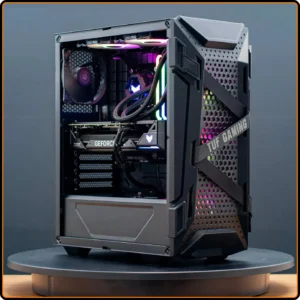
Visually, GT301 plays it safe but effective. The honeycomb perforated front isn’t just an edgy TUF signature. It genuinely lets the thing breathe. Behind it sit three ARGB 120 mm fans – aggressive enough to catch your eye, but not over-the-top. The side panel is a full sheet of tempered glass, showing off every cable, every fan, every questionable decision you made at 3 AM while rerouting cables for the tenth time. And that’s the thing: GT301 expects you to care about presentation. This is not a “hide everything” case. It’s a case that politely reminds you that cable management is a lifestyle. I like that ASUS didn’t pretend this was some luxury spaceship. There are no fake aluminum covers, no weird curves trying to make it look more expensive. It’s straightforward. Industrial. Solid. The plastic doesn’t feel cheap, the metal doesn’t flex unless you really try. When you pull the side panel off and shake it lightly, nothing squeaks. And that silence says more about build quality than any marketing line. One detail that sounds silly until you use it: the TUF headset hook that attaches to either side of the case. It’s such a small thing, but once you get used to it, every other case feels like it forgot something obvious. It just fits the whole aesthetic: practical, military-ish, functional.
Inside layout and the building process
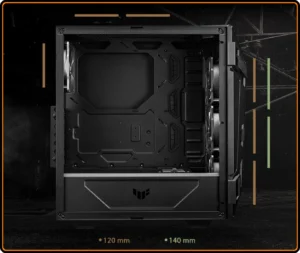
Inside, everything is familiar. PSU shroud across the bottom, motherboard area up top, drive cages tucked where they should be. You get mounts for four 2.5″ SSDs and two 3.5″ HDDs, which is more than enough for 99% of gaming setups. Cable management is…tolerable. Not great, not awful. You can route what you need, but if you treat the back panel like a closet where you throw everything when guests arrive, the glass side panel will expose your sins instantly. It’s one of those cases where planning matters. If you’re the type who builds slow and methodically, you’ll love the structure. If you build like a tornado, you’ll feel punished. The front of the case supports 280 or 360 mm radiators. In theory, that’s amazing. In practice, radiator thickness and tube routing matter. A 240 or 280 mm AIO fits beautifully, but the 360 mm class requires a bit of puzzle-solving. Nothing tragic, just something you need to think about before you start tightening screws. One thing I genuinely appreciate: the case comes with four fans pre-installed three ARGB in the front and one standard exhaust at the back. Not many cases in this price range do that. You can finish an entire build without buying a single extra fan, which is rare these days.
Airflow, temperatures, and noise
Let’s be honest: this case was clearly designed as an airflow-first mid-tower. The giant perforations aren’t decorative. They act like open lungs for the system. With the default fans running intake at the front and exhaust at the back, the case creates a clean, linear flow that moves heat out efficiently. With my own setup a mainstream air cooler and a mid-range GPU that loves increasing room temperature by a degree or two the internal thermals stay surprisingly disciplined. No hot pockets, no heat buildup near the GPU, nothing that feels alarming. And the top panel, also perforated, helps let extra heat escape naturally, even if you don’t install top fans. Noise levels depend on your fan curve. The included fans aren’t premium-silent masterpieces, but they don’t whine or buzz. At lower RPM, the airflow sound is gentle and tolerable. At higher speeds, yes, they get louder, but nothing unexpected. If silence is a priority, fan tuning solves half of the issue immediately. And dust? GT301 comes with filters on the front, top, and PSU intake. That means the case doesn’t turn into a biological ecosystem after two months. Cleaning is easy, and the filters come off without a fight.
RGB, controller, and TUF flavor
If you put three ARGB fans in the front, you’d better give people a reasonable way to control them and ASUS did. GT301 includes a built-in ARGB hub with a physical button on the front panel. If you’re on an Aura Sync motherboard, it all syncs nicely across the system. If not, the button alone gives you enough effects to keep things from looking monotonous. The RGB implementation is restrained. Not too flashy, not too subtle. Just enough to give the case life at night without turning your room into a disco. The TUF branding stays in the background, not screaming for attention. A few design accents, sharp angles, textures. That’s it. And honestly, that’s how it should be.
Limitations and the things that get under your skin
Of course, not everything about the GT301 is golden. This case has a couple of flaws that feel like they could have been fixed with very little effort. The first one is cooler clearance. With a limit around 160 mm, you can fit most mainstream towers, but the tall, bulky air coolers simply don’t fit. You learn this the hard way when you fall in love with a specific cooler on the internet, only to discover the case quietly whispers “no” when you try to close the glass side panel. GPU clearance is another thing you start noticing once you step into the larger, triple-fan GPU territory. Modern cards can easily hit the 320 mm limit when you add a radiator or extra cabling into the mix. Suddenly, a build that looked simple on paper becomes a geometry puzzle. Not impossible, just…a little irritating. Cable management, while functional, could absolutely use more space behind the motherboard tray. You can make it look clean, but it requires discipline, patience and the occasional deep sigh. This isn’t the case where cables magically disappear into some perfect channel. This one asks you to work for it. And then there’s the glass panel. Beautiful. Clean. Honest. Maybe too honest. Every cable you forgot to tuck in, every piece of dust you were too tired to clean, every lazy decision you made inside the case the GT301 shows it to you like a mirror that doesn’t lie. Some cases hide your cruelty. This one exposes it with full transparency.
Living with the GT301 on your desk
But for all those flaws, the GT301 settles into your daily life surprisingly well. It’s the kind of case that becomes part of your desk instead of just holding hardware. The side panel comes off easily, the front panel doesn’t feel like it’ll snap when you remove it, and the frame feels solid even after repeated tinkering. The balance is what keeps me using it. It’s not huge, not tiny, not silent, not loud. It’s a middle ground that works. Airflow is strong enough that you don’t have to obsess over temperatures, the filters catch most of the dust, and the RGB can be as loud or as quiet as you want it to be. At night, when everything else in the room is dark, the case glows in a way that feels calm rather than overwhelming. Sure, sometimes I look at bigger, more luxurious cases and imagine how nice it would be to have more room for cabling or quieter fans. But then I remember the price of this thing and the fact that it comes ready-to-use right out of the box with four fans, glass, filters, mounting options and Aura Sync support. In its category, GT301 punches much harder than it needs to.
Hardware combinations and how the GT301 behaves with different setups
One thing that surprised me after months of using the GT301 is how differently it behaves depending on the hardware you throw into it. With a mid-range setup, the case feels effortlessly balanced. The airflow compensates for most thermals, the noise stays under control, and you never get that sense of suffocation you sometimes see in compact mid-towers. But the moment you start experimenting with hotter GPUs or bigger coolers, you begin to feel the edges of what this case can actually handle. Take high-TDP GPUs for example. A modern RTX card with a chunky triple-fan cooler fits, yes, but it turns the interior into a theatre of compromises. You start thinking about whether a front-mounted radiator will push too close to the card, whether the cables will bend at the right angle, whether the side panel will gently touch the edge of the GPU shroud. These small doubts aren’t dealbreakers, but they force you to be more mindful. GT301 isn’t a playground for oversized hardware; it’s a compact stage where everything has to be choreographed. When I tried pairing the case with an AIO cooler, the story shifted again. A 240 mm fit like a tailored suit, both visually and functionally. A 280 mm was fine, but tight. A 360 mm? Technically possible, practically stressful. Suddenly you’re measuring radiator thickness, fan thickness, tube length, tube stiffness, everything that usually doesn’t matter as much. It reminded me that GT301 rewards reasonable choices. Push it too far, and it pushes back. The PSU shroud, fortunately, gives you a nice sandbox for hiding cables and adapters. If you’re using a modular power supply, you’ll have a smoother time. If you’re not…well, you’ll learn the art of shoving cables gently but firmly into the darkness below. It works, eventually. The case always lets you win, but sometimes after making you sweat a bit first.
Thermals under real pressure and what happens in long gaming sessions
Most reviewers talk about “stress tests,” but the truth is that everyday gaming is the real stress test. A PC that runs well in benchmarks and throttles in a three-hour Apex session is still a problem. The GT301, to its credit, holds up surprisingly well over time. When the GPU heats up the air, the triple front intake keeps pushing fresh airflow through the system, and the rear exhaust does its part clearing the heat. In long play sessions, the internal temperature climbs, sure, but not in an alarming way. The case never feels like an oven. If anything, you get the feeling it’s working alongside your components rather than against them. The top ventilation also helps more than I expected. Even without top-mounted fans, hot air naturally drifts upward and leaves the case without getting trapped near the CPU cooler. With two extra fans on the roof, the thermal behavior becomes noticeably smoother, like the case suddenly develops better lungs. The funny part is that the noise behavior doesn’t follow the same curve. The included fans plateau quickly. They sound the same at medium load as they do at high load, which is a blessing and a curse. A blessing because it never becomes unbearable. A curse because the fans lose finesse at lower speeds. You hear airflow, not mechanics, and that’s at least the kind of noise you can live with.
Everyday quirks you only notice after months of ownership
Living with the GT301 for a long time reveals things you simply can’t catch on day one. Like how the front panel, despite being easy to remove, has a bit of resistance that makes you hesitate every time you pull it. Not enough to annoy you, but enough to treat it with respect. Or how the tempered glass panel is a personality test. When it’s clean and the cables are tidy, it looks incredible. When it’s not, you feel judged by an inanimate object. It’s the kind of case that motivates you to keep your setup clean simply because the alternative looks depressing. Another subtle detail is how the RGB feels at night. Some cases drown your room in neon chaos. GT301 doesn’t. The lighting has a softer character, almost warm in a strange techno way. Even when all fans pulse in sync, it doesn’t feel overwhelming. It feels like the case wants to be part of your environment, not dominate it. Dust is still the eternal enemy, but GT301 gives you a fighting chance. The filters collect most of the airborne debris, and you end up cleaning the interior far less often than you would expect from such an open design. It’s one of those small victories that make ownership easier.
Reflections on value, comfort and personality
The thing about the GT301 is that it’s not just a technical object. After using it for months, it becomes part of the rhythm of your workspace. When you sit down, the glow is familiar. When you open it to swap hardware, the layout becomes second nature. And when you game late at night, the soft light from the ARGB fans becomes part of the atmosphere. It’s not perfect. It’s not premium. It’s not revolutionary. But it is honest. And honest hardware tends to age well. Some cases impress you in the first week and annoy you a month later. Some cases start bland and stay bland. GT301 belongs to the rare group of cases that grow alongside you. The more you build inside it, the more you understand what it’s doing right. Is it the best airflow case in the world? No. Is it the most spacious? Definitely not. Is it the quietest? Also no. But does it balance airflow, aesthetics and value in a way that’s refreshing, functional and consistently enjoyable? Yes. Without hesitation. It competes in a crowded mid-range market and still manages to feel distinct. Not by screaming louder, but by working smarter. And that’s why, after all this time, I still keep it on my desk. Not because it’s perfect, but because it earned its place.